



OPERATING INSTRUCTIONS
BEDIENUNGSANLEITUNG
MODE D’EMPLOI
ISTRUZIONI PER L’USO
INSTRUCCIONES DE OPERACION
GEBRUIKSAANWIJZING
BRUKSANVISNING

IMPORTANT TO SAFETY
TO PREVENT FIRE OR SHOCK HAZARD, DO NOT EXPOSE THIS APPLIANCE TO RAIN OR MOISTURE.
The lightning flash with arrowhead symbol, within an equilateral triangle, is intended to alert the user to the presence of uninsulated “dangerous voltage” within the product’s enclosure that may be of sufficient magnitude to constitute a risk of electric shock to persons.
The exclamation point within an equilateral triangle is intended to alert the user to the presence of important operating and maintenance (servicing) instructions in the literature accompanying the appliance.


Cautions on handling
Noise or disturbance of the picture may be generated if this unit or any other electronic equipment using microprocessors is used near a tuner or TV. If this happens, take the following steps:
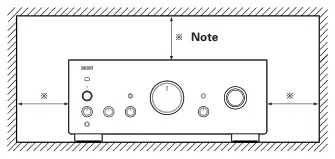
Wall

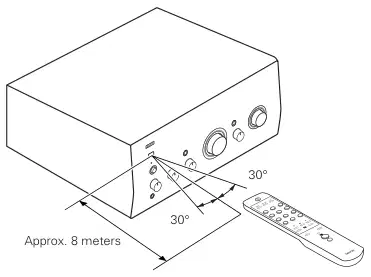
The accessory remote control unit is used to control the amplifier from a convenient distance.
q Remove the battery cover on the remote control unit.
w Insert two dry cell batteries as shown in the diagram on the
battery supply unit.
e Replace the battery cover.
Besides being able to operate the PMA-2000AE integrated-
amplifier with this remote control unit, you can also operate a DENON CD player from this handy
remote control unit.

TUNER:
Used to recording from the tuner. AUX-1:
Used to recording component that connected to the DVD/AUX-1 terminals. AUX-2:
Used to recording component that connected to the AUX- 2 terminals.
Use this position when using the tape deck, etc., connected to the TAPE-2/MD terminals. TAPE-1/CD-R:
Use this position when using the tape deck, etc., connected to the TAPE-1/CD-R terminals. PHONO:
Use this position when using the record player connected to the PHONO terminals. Use the CARTRIDGE switch to switch the sensitivity to correspond to the cartridge type being used. CD:
Used to listen a CD player or other component that is connected to the CD terminals. TUNER:
Used to play a component such as an FM/AM tuner or a TV tuner that is connected to the TUNER terminals. DVD/AUX-1:
Used to play a component such as a HiFi video player, TV tuner or tape deck that is connected to the DVD/AUX-1 terminals. AUX-2:
Used to play a component such as a HiFi video player, TV tuner or tape deck that is connected to the AUX-2 terminals.
Use this position when making copies of tapes using two tape decks. The input signal from the deck connected to the TAPE-1/CD-R input terminals is fed to the TAPE-2/MD REC terminals. PHONO:
Used to recording from the turntable. CD:
Used to recording from the CD player.

!5 REC. (REC OUT) terminals
The Indicator for the program source selected with the INPUT SELECTOR control lights.
P. DIRECT terminals selected, and input indicator is turned off. OFF:
Selected INPUT SELECTOR knob makes program source play.
!4 INPUTS terminals

PROGRAM DIRECT
CALL
DVD/AUX-1 TUNER CD AUX-2
TAPE-2/MD TAPE-1/CD-R PHONO
t
When the button is pressed.
CLEAR
TAPE-2/MD TAPE-1/CD-R PHONO
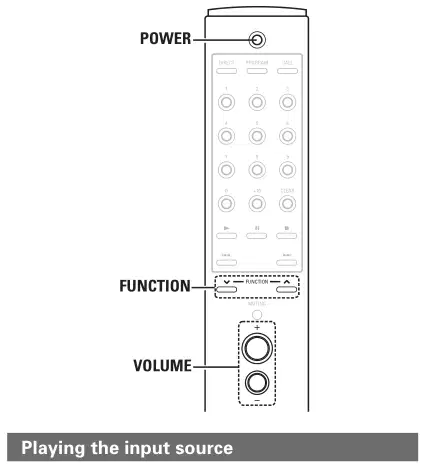
e MUTING button
CD
FUNCTION
MUTING
e
r
+:
While this is pressed, the main unit’s VOLUME control knob turns clockwise and the volume increases. –:
While this is pressed, the main unit’s VOLUME control knob turns counterclockwise and the volume decreases. t CD player block
Use these to control the CD player connected to the PMA-2000AE.
DIRECT : Direct play back PROGRAM : Program play back CALL : Program calling 0~9,+10 : Number CLEAR : Program clearing
(to beginning of track)
(to beginning of track)
9 button is pressed shortly then released, and the manual search mode is set when one of the buttons is held in.
+10 0

Protective Circuit This set is equipped with a high speed protective circuit. This circuit protects the internal circuitry from damage due to large currents flowing when the speaker jacks are not completely connected or when an output is generated by a short circuit. This protective circuit’s operation cuts off the output to the speakers. In such a case, be sure to turn the power off and check the connections to the speakers. Then turn the power on again. After muting for several seconds, the set will operate normally.
clockwise to tighten it.
Either tightly twist or terminate the core wires. Speaker cords
Speaker terminal

DVD player (sound only)
DVD player (sound only)
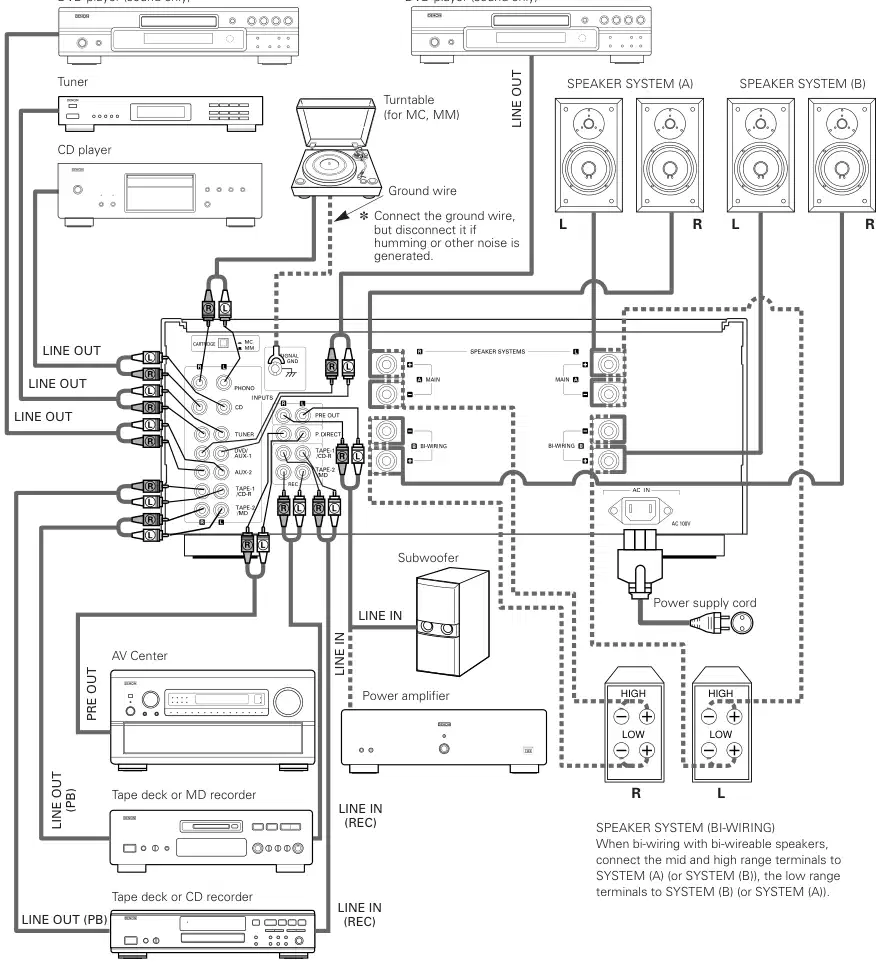
but disconnect it if humming or other noise is generated.
SPEAKER SYSTEM (BI-WIRING) When bi-wiring with bi-wireable speakers, connect the mid and high range terminals to SYSTEM (A) (or SYSTEM (B)), the low range terminals to SYSTEM (B) (or SYSTEM (A)).

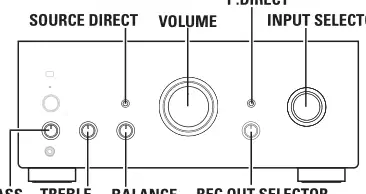
REC OUT SELECTOR
Preparation
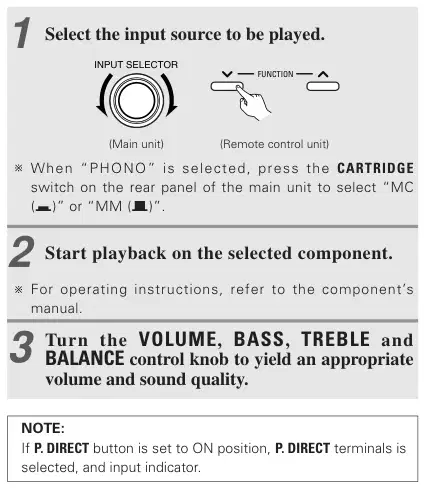
When “PHONO” is selected, press the CARTRIDGE switch on the rear panel of the main unit to select “MC (¢)” or “MM (£)”. 2 Start playback on the selected component.
2 Setting of each knob
After checking the above items, turn on the power, the amplifier is set in the ready mode in a few seconds.
3 Turn the VOLUME, BASS, TREBLE and BALANCE control knob to yield an appropriate volume and sound quality.
2 Checking connections

2 Monitoring the recording
A recording in progress can be monitored if a tape deck with three individual heads for recording and playback is used. A tape deck in which a common head is used for both recording and playback cannot be used to monitor recording. When a recording is being made using TAPE-1/CD-R, selecting TAPE- 1/CD-R with the INPUT SELECTOR knob will engage the RECORDING MONITOR and pemit a check of the recording condition.
1 Set the REC OUT SELECTOR knob to the program source you wish to record. 2 Play back the program source.
2 Copy from one tape to another
To copy from TAPE-1/CD-R to TAPE-2/MD, set the REC OUT SELECTOR knob to “TAPE-1 1 2”.

Check the following before assuming there is a problem with the set.
If the set does not seem to be operating properly, check the points listed below. If these points do not apply, the set may be damaged. Turn off the power immediately and contact your store of purchase.
Symptom Cause Measures Page
Common problems arising when listening to the
Power indicator does not light and no sound is produced when POWER switch is turned on.
CD, records, tapes, and FM broadcasts, etc.
Power indicator lights but no sound is produced.
Sound is not produced from one side only.
Volume level is different when listening to tuner and records.
Positions of instruments inverted for stereo sources.
Problems occurring when playing records. Remote control unit.
Booming sound produced when playing records.
Howling produced when volume is turned up while playing records.
Sound is distorted.
This unit is not operated properly when remote control unit is used.

2 POWER AMPLIFIER SECTION Rated Output Power: Both channel driven (8 Ω/ohms Load) 80 W + 80 W 20 Hz to 20 kHz, T.H.D. 0.07 % (4 Ω/ohms Load) 160 W + 160 W DIN, 1 kHz, T.H.D. 0.7 % Total Harmonic Distortion: 0.01 % (–3 dB at rated output, 8 Ω/ohms) (1 kHz) Input Sensitivity/Input Impedance: P. DIRECT: 0.9 V/47 kΩ/kohms Amplification factor: 29 dB
2 OVERALL CHARACTERISTICS SN Ratio (IHF A Network): PHONO (input terminals short- circuited) MM: 89 dB (at 5 mV input) (input terminals short- circuited) MC: 74 dB (at 0.5 mV input) SOURCE-DIRECT: ON CD, TUNER, DVD/AUX-1, AUX-2, TAPE-1/CD-R, TAPE-2/MD:
108 dB Tone Control Adjustable Range: BASS: 100 Hz ±8 dB TREBLE: 10 kHz ±8 dB
2 PRE AMPLIFIER SECTION PHONO EQUALIZER Rated Output: 150 mV (Recout Terminal) Input Sensitivity/Input Impedance: The value in parentheses ( ) refers to the input impedance when SOURCE DIRECT is ON. PHONO: MM: 2.5 mV/47 kΩ/kohms MC: 200 µV/100 Ω/ohms CD, TUNER, DVD/AUX-1, 135 mV/47 kΩ/kohms AUX-2, TAPE-1/CD-R, (135 mV/16 kΩ/kohms) TAPE-2/MD RIAA Deviation: PHONO: 20 Hz ~ 20 kHz ±0.5 dB Maximum Input: PHONO MM: 130 mV/1 kHz MC: 10 mV/1 kHz Rated Output: PRE OUT: 0.9 V (Input CD 135 mV)
2 OTHERS Power Supply: AC 230 V, 50 Hz Power Consumption: 310 W (IEC) Dimensions: 434 (W) x 181 (H) x 480 (D) mm (17-3/32” x 7-9/64” x 18-29/32”) Net Mass: 24.0 Kg (52 lbs 14.7 oz)
2 REMOTE CONTROL UNIT (RC-998) Remote control system: Infrared pulse system Power supply: 3 V DC, Two size R03 (AAA) dry cell batteries External dimensions: 44 (W) x 233 (H) x 22 (D) mm (1-47/64” x 9-3/16” x 7/8”) Mass: 165 g (Approx. 5.8 oz) (including batteries)
✽Maximum dimensions include controls, jacks, and covers.
(W) = width, (H) = height, (D) = depth • For improvement purposes, specifications and functions are subject to change without advanced notice.
Problèmes fréquents, causes probables et solutions.
| Problème | Cause possible | Solution | |
|---|---|---|---|
| Power indicator does not light and no sound is produced when POWER switch is turned on. | • Power supply cord is not connected. | p.13 | |
| Power indicator lights but no sound is produced. | • Speaker cords not properly connected. • INPUT SELECTOR knob or P. DIRECT switch is not set to proper position. • VOLUME control knob turned down. | p.13 | |
| Sound is not produced from one side only. | • Speaker cords not properly connected. • Input cords not are properly connected. • Left/right balance improperly adjusted. | p.13 | |
| Volume level is different when listening to tuner and records. | • Tuner or record output is different. | p.13 | |
| Positions of instruments inverted for stereo sources. | • Left and right speakers or input cords the inverted. | p.13 | |
| Booming sound produced when playing records. | • Turntable’s ground wire is not connected. • Input cords are not properly connected to PHONO terminals. • Influence from a TV or VCR near the turntable. | p.13 | |
| Howling produced when volume is turned up while playing records. | • Turntable and speaker systems are too close. • Floor is soft and vibrates easily. | p.13 | |
| Sound is distorted. | • Stylus pressure is too light. • Dirt on tip of stylus. • Defective cartridge. | p.13 | |
| This unit is not operated properly when remote control unit is used. | • Batteries are dead. • Remote control unit is too far from this unit. • Obstacle between this unit and remote control unit. • Different button is being pressed. • < and > ends of battery is inserted in reverse. | p.13 |
Les utilisateurs et notre équipe répondent généralement sous 24 h — et votre question servira aussi aux suivants.
Soyez le premier à poser une question — d'autres utilisateurs ou notre équipe y répondront.